You’re putting in the work. Make it count.
Bring your goal, training data and available time together in Primed. Build a structured plan, understand your sessions and talk through what needs to change.
Start with Free. Optional Pro upgrade.
What you see in the app
A plan built around the days you can actually ride.
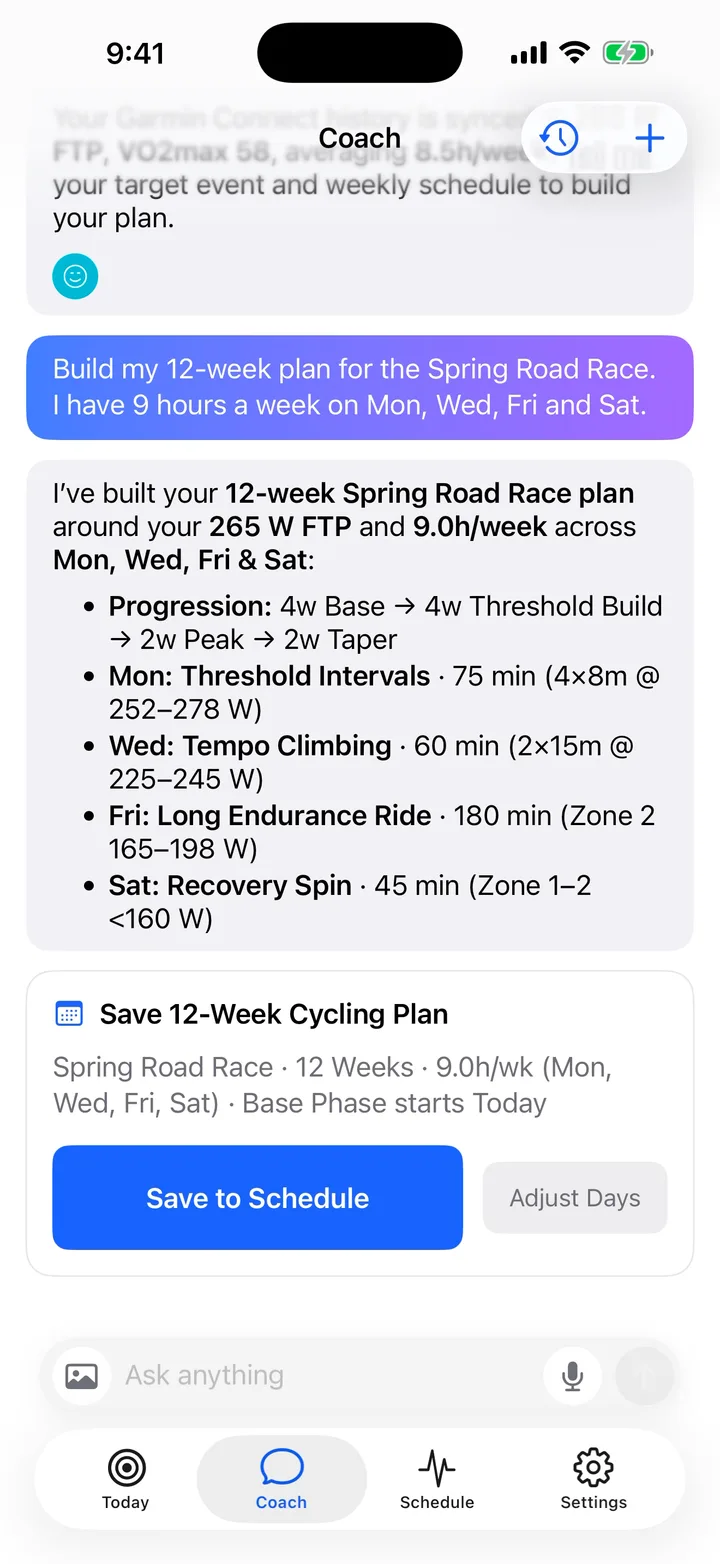
- 12-week direction in chat: Coach outlines your block progression from your goal, available days, and connected training history.
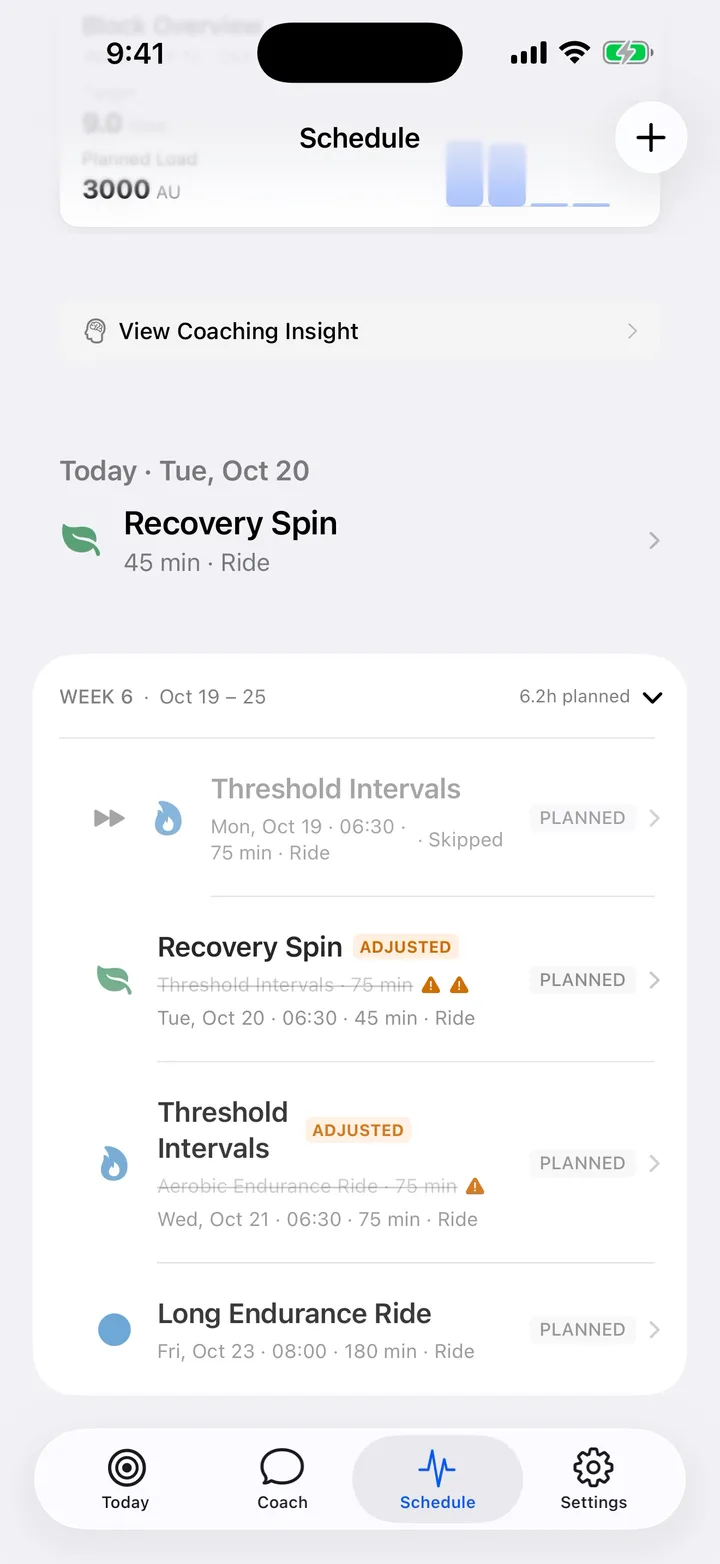
- Scheduled on your calendar: Your weekly sessions appear on your Schedule tab matched to your available riding windows.
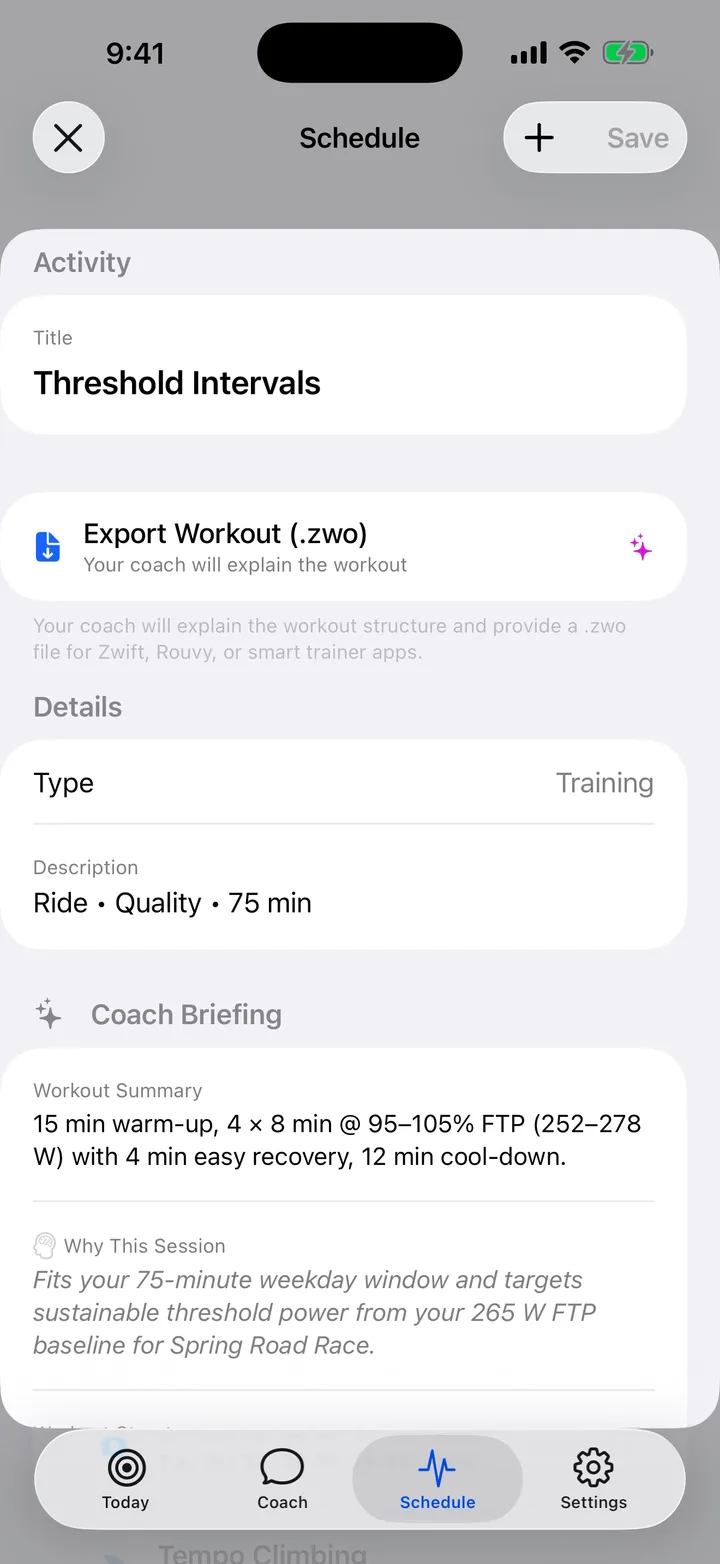
- Clear session rationale: Every workout explains why it is prescribed and supports Zwift (.zwo) export.
From your goal to your next training week.
See how a goal and real-world availability become a structured week you can review and save.
30-second demonstration: A cyclist shares a 12-week Spring Road Race goal and four available weekly training days with Primed Coach. Using connected training data (265 W FTP in this example), Coach outlines the 12-week progression in chat and builds the structured weekly schedule. The cyclist views the current week's dated sessions on the Schedule tab and opens Tuesday's 75-minute Threshold Intervals session to inspect the 4 × 8-minute structure, session rationale, and Zwift (.zwo) export.
Read video transcript (30s)
- 0:00 — You track every ride. But is your training taking you towards your goal?
- 0:04 — Tell Primed what you’re aiming for and when you can train.
- 0:10 — Use your training data to build a structured week, save it to your schedule, and see why each session is there.
- 0:25 — Make your training count. Try Primed free.
What happens in this recording: Coach outlines a 12-week climbing progression in chat around the rider’s available days and connected training history (265 W FTP in this example), and the weekly view on the Schedule tab displays the 4 scheduled sessions for the current week (5h 30m) with session rationale and .zwo workout file export for Zwift.
Direction for the block. Clarity for today’s ride.
- 01Coach chat · Goal & availability
Set your direction
Your goal, available time and training context.
Tell Coach what you are working toward, which days you can ride, and connect your training history from your devices and platforms (Garmin, Apple Health, Intervals.icu, Oura, WHOOP, Withings). Coach outlines your multi-week progression and builds your structured schedule around the days you can actually ride.
- 02Schedule tab · Session rationale & Zwift (.zwo) export
Understand the work
Planned sessions and their rationale.
Your planned workouts appear on your Schedule tab by week. Open any ride to inspect the interval targets, read the Why This Session rationale, or export a standard .zwo workout file for Zwift.
- 03Schedule updated · Adapted to real life
Keep the plan relevant
Discuss completed sessions, feedback and changes in circumstances.
After a ride—or when work runs late or a session is missed—talk through what changed with Coach so your upcoming sessions stay realistic for the time and recovery you have.
“The real value I see in Primed is the Coach’s ability to articulate what my fitness is actually doing.”
Andrew, cyclist and Primed beta tester
Want to inspect a real mid-ride coaching conversation from an indoor interval session?
Explore Richard’s mid-ride example (optional)Optional supporting evidence · Recorded 22 September 2026 ride
What happens when the intervals feel harder than they should?
Planning the week is the starting point. Here is a recorded indoor session where heart rate drifted higher than normal mid-ride—and how Coach weighed the live data before advising an early finish.
“It gave me the confidence to stop, and know that I was doing the right thing.”
Push or ease? See how the conversation unfolded.
A real ride. A real question. A clearer decision.
Open the 45-second replay to explore the minute-by-minute power and heart-rate chart alongside Richard’s three mid-ride messages with the Primed Coach—plus the full verbatim transcript.
What you can try on Free — and what Pro adds
- AI coach conversation to build a training week around your goal and available days
- Session-by-session workout structure, wattage targets, and Why This Session rationale
- On-the-fly schedule adjustments when you miss a ride, run short on time, or need recovery
- Standard Zwift (.zwo) workout file export from Workout Detail for indoor smart trainers
- Supported connections: Garmin (free account supported), Wahoo, Apple Health, Intervals.icu, Oura, WHOOP, Withings & FatSecret
Optional Pro upgrade: Adds longer-term coaching memory across weeks and pattern-based insights ($19.99 USD/month or $129.99 USD/year in-app; local currency shown in the App Store). Compare full details on Free and Pro plans.
First steps after installing
- 1. Install & open Primed
Download Primed free on iPhone, iPad, or Mac and create your account.
- 2. Connect your training data
Link your devices and platforms—Garmin, Wahoo, Apple Health, Intervals.icu, Oura, WHOOP, or Withings—so Coach can read your rides, power/heart rate, and recovery signals, or share your current routine in chat.
- 3. Build your training plan
Share your goal and the days you can ride in Coach chat. Coach builds your structured plan and populates your weekly sessions on the Schedule tab.
Primed is live today on iPhone, iPad, and Mac. Android is currently in development and not yet released—join the waitlist for Android release updates:
Supporting example: Only 40 minutes instead of a planned 60-minute ride? See how single-session adaptation worksExpand details ↓
When a busy day compresses a planned 60-minute threshold ride into a 40-minute window, you can tell Coach “I only have 40 minutes today.” Coach proposes a condensed interval structure (for example, 3 × 8 minutes at threshold instead of 4 × 8 minutes) so you can review the change and save it to your Schedule, or export the updated .zwo file for Zwift.
Watch the missed-ride adaptation video on the Coach page or view the previous 40-minute comparison page.
You’re putting in the work. Make it count.
Start with Free. Optional Pro upgrade.