Primed on iPhone Duo

Your training and your coach. Side by side.

See your daily briefing alongside your coaching conversation, so you can explore what today’s training means without switching between screens.

Available on iPhone, iPad and Mac. Start free.

01 — TWO-PANE WORKFLOW

You’ve done the ride. What does it mean for tomorrow?

Review your session with Coach while keeping your daily briefing and schedule in view on iPhone Duo.

In this 45-second narrated illustrative demo on iPhone Duo, a cyclist opens a completed 72-minute Threshold Intervals ride (92% of planned work completed, 3 of 4 intervals held on target, 4% heart rate drift), unfolds to a two-pane side-by-side layout showing Today alongside Coach chat, and reviews why tomorrow’s 45-minute recovery spin remains scheduled at a 175-watt cap.

Illustrative demo with example data.

Read transcript · Post-ride coaching decision (45s)
  1. 0:00 — You’ve just finished a hard threshold ride. What does it mean for tomorrow’s session?
  2. 0:05 — Primed syncs your Garmin ride automatically: 92% of planned work completed, 3 of 4 intervals held on target, with 4% heart rate drift.
  3. 0:14 — Ask Coach what comes next. Grounded in your ride execution and 91 AU chronic load, Coach explains that a 6% fade on the final rep is normal fatigue, not overreaching.
  4. 0:28 — The decision: keep tomorrow’s 45-minute recovery spin as scheduled, capped at 175 watts.
  5. 0:38 — Every ride informs the next. Get Primed at beprimed.ai.

02 — DESIGNED FOR THE UNFOLDED DISPLAY

Guidance and conversation,
together in one view.

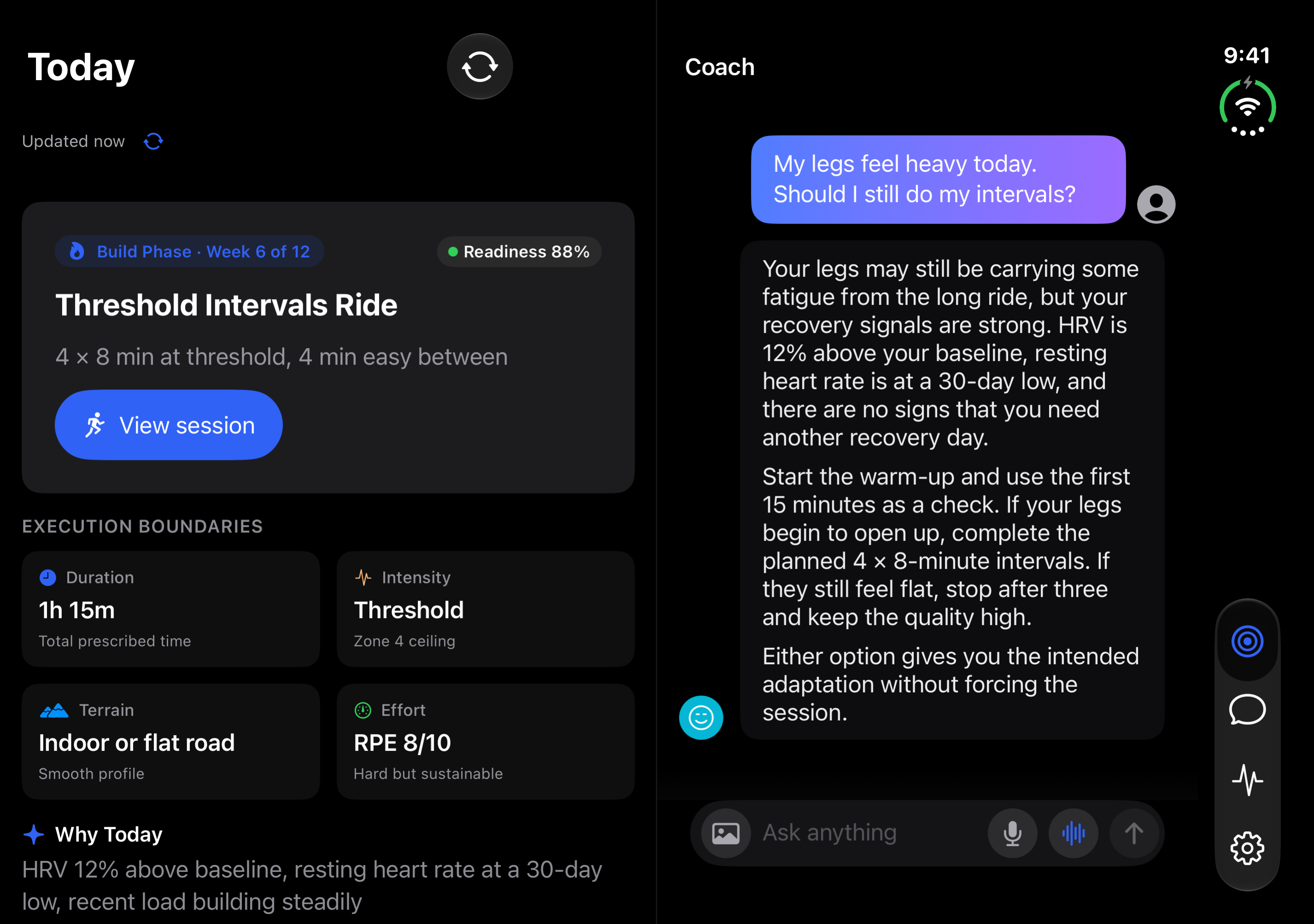
On iPhone Duo, Primed pairs your daily training view with Coach chat so you can check session details and talk through adjustments in the same workspace.

Your daily guidance stays in view while you talk with Coach.

Keep Today or your weekly Schedule visible alongside Coach chat on the unfolded display, so you can ask questions without losing your place.

Explore the reasoning behind your next training decision.

Review completed workouts, recovery context, and the rationale behind today’s recommendation side by side before deciding what to do next.

Layouts adapt as you fold and unfold your iPhone Duo.

Move between a focused single-column view when folded and a side-by-side workspace when unfolded, with navigation arranged for the wider display.

03 — FROM THE RELEASED APP

Today and Coach,
side by side.

An unmodified capture from the released iPhone Duo layout using anonymous sample training data, showing the daily recommendation on the left and Coach chat on the right.
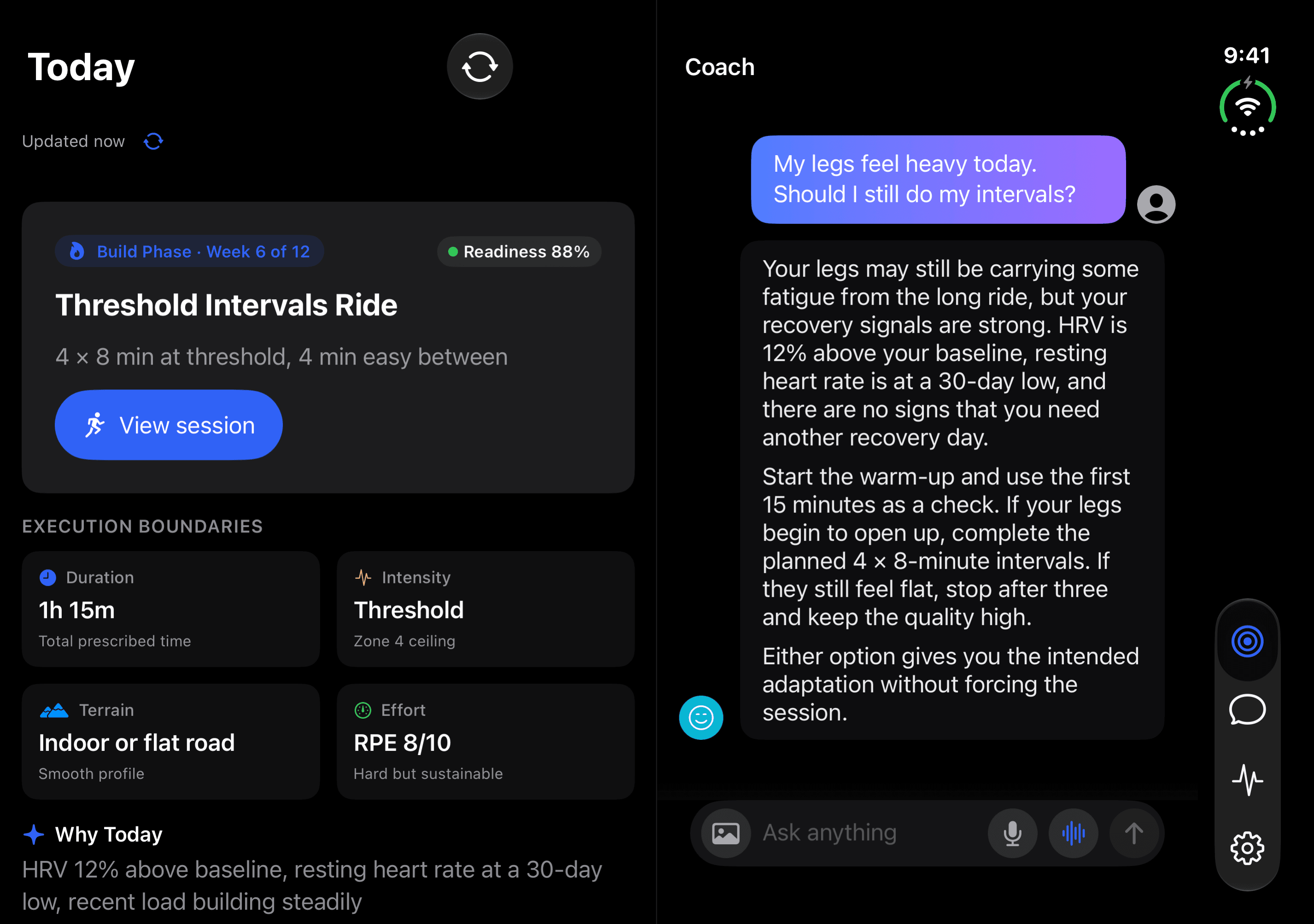
Primed on iPhone Duo unfolded: Today view on the left showing Threshold Intervals Ride and execution boundaries alongside Coach chat on the right explaining how to approach the warm-up when legs feel heavy.
FROM THE APP · TODAY AND COACH SIDE BY SIDE (EXAMPLE DATA)View full-size screenshot

GET PRIMED

Your training.
A conversation worth having.

Start free. Pro adds longer-term memory and coaching insights.

Explore the broader Coach story or compare plans on Pricing.