Connect your Primed account to ChatGPT and ask about your existing Primed training and coaching. Check today’s session, understand why your plan adapted, or look ahead to the weekend—without copying workouts into a chat window.
Read-only access to your Primed coaching and schedule · Cannot modify your training plan
See Primed in ChatGPT.
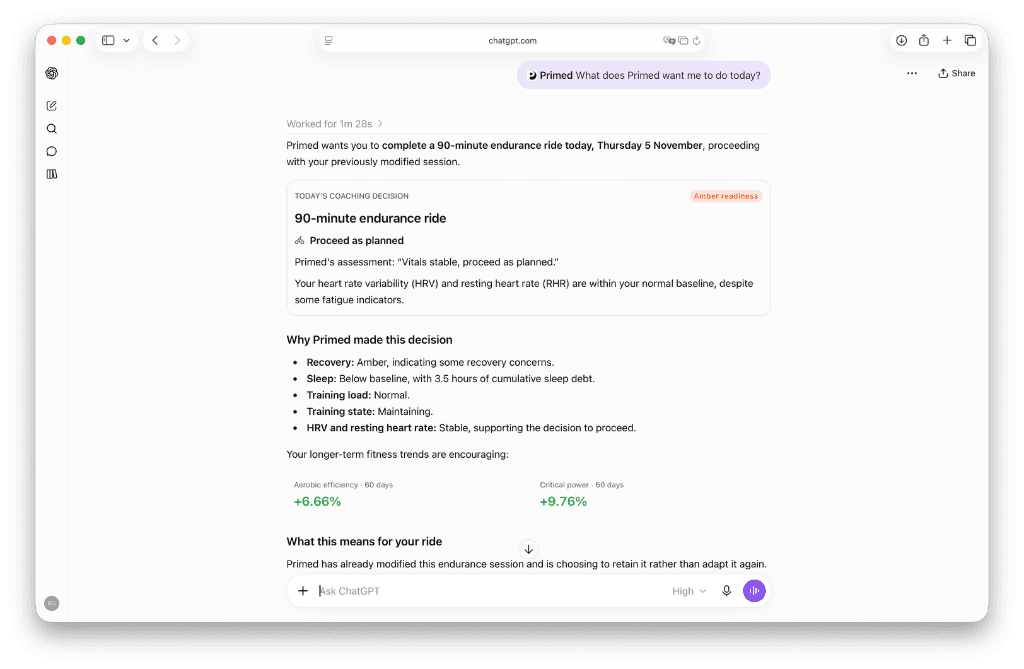
Ask @Primed what is on your schedule today and receive your daily coaching decision, readiness context, and fitness trends directly in ChatGPT.
Example response in ChatGPT: Asking @Primed “What does Primed want me to do today?” returns your canonical daily coaching decision (90-minute endurance ride · Proceed as planned), the readiness signals behind the recommendation (HRV, resting heart rate, sleep debt, and training load), and recent 60-day fitness trends.
PRACTICAL COACHING CONTEXT
Start with what Primed already knows.
Generic ChatGPT only knows what you type into a prompt. When you connect your Primed account, ChatGPT can retrieve and explain your actual daily coaching recommendation, adaptation reasons, upcoming schedule, and recent training summaries from Primed.
Example questions
“What does Primed want me to do today?”
“Why did my training change today?”
“What training have I got this weekend?”
“How has my training gone over the last week, and how am I tracking now?”
HOW TO CONNECT
Connect your Primed account in three steps.
You need an existing Primed account and a ChatGPT account with access to connected apps in your region and plan.
01
Open Primed in ChatGPT
Open the official Primed listing in ChatGPT, or look for Primed in ChatGPT’s apps directory, and choose the option to connect your account.
02
Sign in with your Primed account
Sign in when redirected to Primed’s authentication page (auth.beprimed.ai) and review the read-only permissions requested for your profile, coaching, schedule, and recent activity summaries.
03
Ask about your training
Select Primed or mention @Primed in ChatGPT to ask about today’s coaching recommendation, why a session changed, or what training is coming up on your Primed schedule.
TRANSPARENT DATA ACCESS
What Primed shares — and the read-only boundary.
When you ask a question using the Primed integration in ChatGPT, relevant information from your Primed account is passed to ChatGPT to answer your request.
What ChatGPT can retrieve from Primed
Connected athlete profile: Your display name, primary sport, timezone, and account status so responses match your local schedule.
Today’s coaching recommendation: Your canonical daily coaching decision from Primed, including today’s planned or adapted session and the reasons behind any change.
Upcoming training schedule: Your scheduled sessions for the next 1 to 14 days (7 days by default) in your athlete timezone.
Training & recovery status: High-level training state, recovery status, load status, and key readiness drivers.
Recent activity summaries: Completed workout summaries (sport, duration, and training load) over the last 1 to 28 days from supported sources in your Primed account.
Read-only boundary & limitations
Read-only access (no plan edits): The integration can retrieve and explain information from Primed, but it cannot change your Primed training plan, create or edit workouts, log sessions, or modify account settings.
Coaching authority stays in Primed: Wearable connections, readiness evaluation, and plan adaptations happen inside the Primed app on iPhone, iPad, Mac, and the web (app.beprimed.ai).
Minimized coaching summaries: Responses are scoped to coaching and training summaries rather than raw second-by-second sensor streams or medical records.
Availability & eligibility: Access to apps in ChatGPT depends on OpenAI’s supported countries, platforms, and ChatGPT plans.
PRIVACY, DISCONNECTING & QUESTIONS
Good to know before you connect.
Review how your information is handled when you connect ChatGPT, how to disconnect at any time, and where to find our full privacy and technical documentation.
Can ChatGPT change my training plan or create workouts?
No. The ChatGPT integration is strictly read-only. It can retrieve and explain your existing Primed coaching decision, upcoming schedule, training status, and recent workout summaries, but it cannot edit your plan, create or reschedule workouts, or change your Primed settings. To build or adjust your training plan, use Primed on iPhone, iPad, Mac, or the web at app.beprimed.ai.
What do I need to use Primed in ChatGPT?
You need an existing Primed account with your training context set up in Primed, plus a ChatGPT account that supports connecting apps. Feature availability in ChatGPT—including supported countries, devices, and ChatGPT subscription tiers—is controlled by OpenAI. Check your Primed account for the coaching features available on your Primed plan.
How is my information shared and handled?
When you connect your Primed account and ask a question in ChatGPT, relevant information from your Primed account (such as today’s coaching summary, upcoming sessions, or recent activity summaries) is passed to ChatGPT so it can answer your request. While Primed does not use your data to train general-purpose AI models or provide your data to Primed’s own AI sub-processors for model training, information shared into a ChatGPT conversation is handled by OpenAI under OpenAI’s privacy policy, terms, and your ChatGPT account settings.
How do I disconnect Primed from ChatGPT?
You can disconnect or remove Primed at any time from your connected apps or settings in ChatGPT, which stops ChatGPT from making further requests to your Primed account. If you need help revoking access from the Primed side, contact support@beprimed.ai.
USE PRIMED IN CHATGPT
Bring your Primed coaching into the conversation.
Connect your existing Primed account in ChatGPT, or download Primed on iPhone, iPad, and Mac to build and adapt your training plan.