How to Use Intervals.icu With an AI Cycling Coach
Intervals.icu gives self-coached cyclists extraordinary visibility into load and power curves, while intentionally leaving daily coaching judgement to you. Here is how to layer Primed on top cleanly.

If you already rely on Intervals.icu, adding an AI cycling coach should not force you to give up your Fitness/Fatigue charts, rolling power-duration curves or custom wellness plots. Intervals.icu is designed as a high-precision analytical workbench: it computes Chronic Training Load (Fitness/CTL), Acute Training Load (Fatigue/ATL), Form (TSB), eFTP and zone distributions transparently, while leaving daily coaching interpretation to you or your coach. Connecting Intervals.icu to Primed adds that missing decision layer — weighing your load balance alongside overnight sleep, HRV, schedule disruptions and how your legs actually feel before you clip in.
Key takeaways
- Intervals.icu excels at load charts, power curves and workout calendars.
- Form (TSB) measures load balance, not sleep quality or life stress.
- Primed Free ($0) imports up to 180 days of non-Strava Intervals.icu data.
- Outgoing Workout Sync back to your Intervals.icu calendar is strictly opt-in.
- Strava API rules prevent Strava-sourced rides forwarding through Intervals.icu.
Why fitness charts still leave a Thursday-morning judgement gap
Intervals.icu models Form (TSB = CTL − ATL or percentage of CTL) from completed training stress. That mathematical balance is indispensable for season planning, yet two physiological blind spots catch self-coached cyclists out every month:
- Form is load arithmetic, not autonomic readiness: A rider can sit at a comfortable Form of
-5after two light days while carrying four five-hour nights of work-travel sleep debt, elevated resting heart rate or an early sore throat. Conversely, a rider sitting at-22during a well-fuelled, low-stress camp may feel strong and absorb one more aerobic day cleanly. - Charts describe what happened; coaching decides what bends next: When a late meeting cuts Thursday's 75-minute threshold window down to 45 minutes three days before a priority bunch ride, Intervals.icu shows your curves clearly — it does not debate whether to condense intervals to
3 × 8 min, spin easy in Zone 2, or swap Thursday and Saturday.
Verified connect and sync workflow in Primed
Connecting Intervals.icu is included in Primed Free ($0) — no Pro subscription or credit card is required (Primed + Intervals.icu).
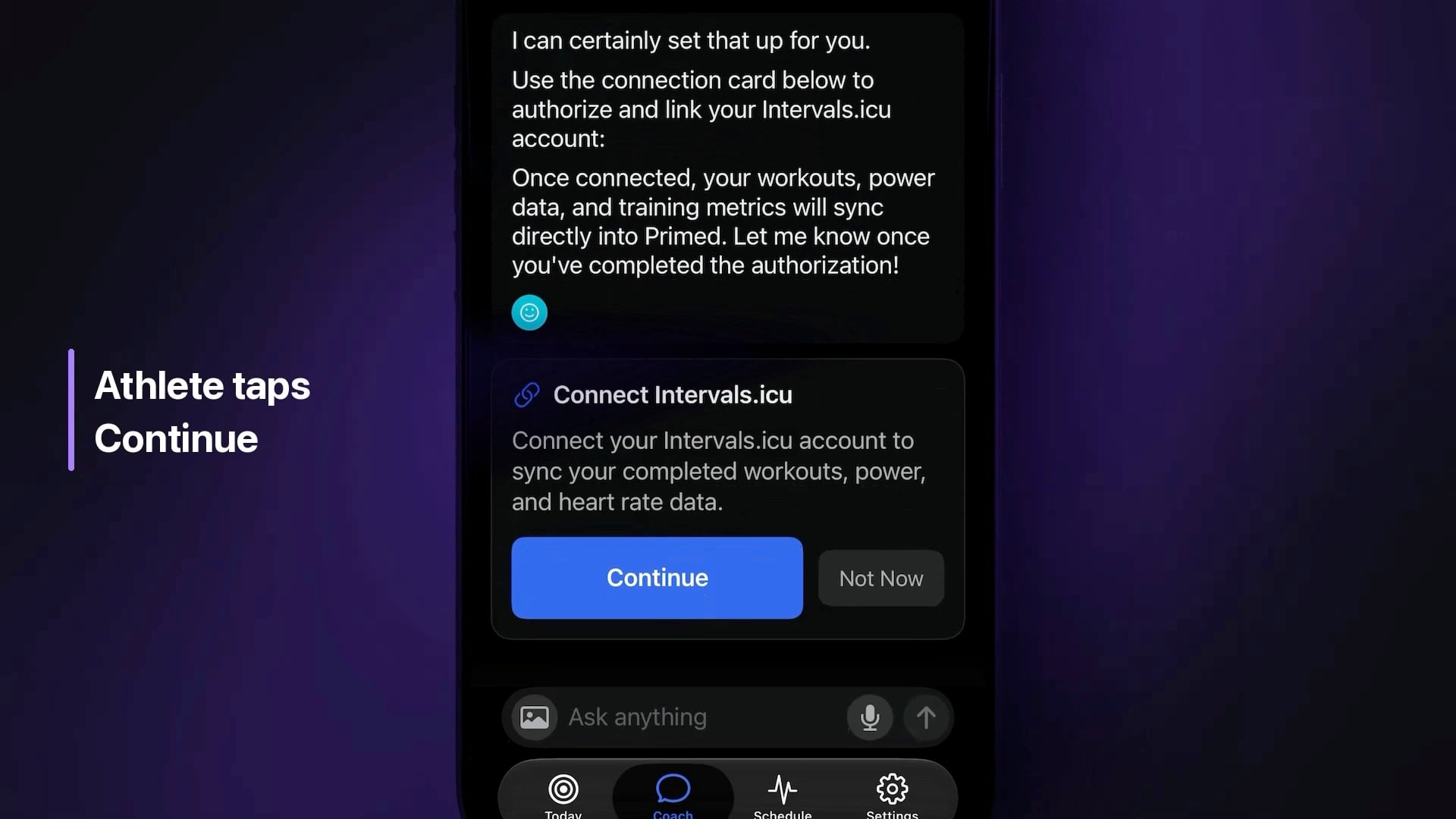
Connecting Intervals.icu in Primed brings your approved non-Strava activity history, wellness metrics and sport settings into Coach chat.
Step 1: Connect via OAuth and review permissions
- Open Primed on iPhone, iPad, Mac or the web (
app.beprimed.ai) and navigate to Settings → Connections. - Choose Intervals.icu and approve the scopes you want to grant on the official Intervals.icu OAuth screen.
- Primed imports your most recent 28 days first so you can start talking with Coach immediately, then backfills up to 180 days of eligible history.
Step 2: Separate inbound history from opt-in outgoing calendar sync
Primed treats reading your history and writing to your calendar as two separate permissions:
| Direction | Default state | Verified scope and boundaries |
|---|---|---|
Inbound (Intervals.icu → Primed) | Active on connect | Imports up to 180 days of non-Strava activity summaries and daily wellness records (HRV, resting HR, sleep, weight), plus your cycling/running sport settings (FTP, LTHR, max HR) and calendar context. During chat, Coach can inspect interval splits and high-resolution streams on demand. |
Outbound (Primed → Intervals.icu) | Off by default (explicit opt-in) | If you toggle on Outgoing Workout Sync in Settings → Connections, Primed publishes its planned structured cycling, running and swimming sessions to your Intervals.icu calendar. Primed never edits or deletes workouts created outside Primed. |
Step 3: Revoking or pausing sync cleanly
Turning off Outgoing Workout Sync stops future calendar publishing while leaving already-exported workouts untouched. Disconnecting Intervals.icu in Primed (or in your Intervals.icu account settings) immediately revokes Primed's OAuth token. Note that disconnecting halts future sync rather than deleting previously imported history; full account and data deletion lives under Settings → Account → Delete Account.
Illustrative worked example: interpreting a -19 Form week
The scenario below is an illustrative walkthrough showing how analytics and coaching context combine, not an attributed customer record.
- Intervals.icu snapshot (Thursday morning):
- Fitness (CTL):
58· Fatigue (ATL):77· Form (TSB):-19. - Recent rides: Saturday 3.5 h hilly bunch ride (195 load), Sunday 2 h Zone 2 (92 load), Tuesday
5 × 4 minat 108% eFTP (completed, but heart rate drifted +7 bpm from rep 2 to rep 5 and decoupling rose). - Wellness plot: Overnight rMSSD HRV down 11% versus 30-day rolling mean; resting HR +3 bpm.
- Fitness (CTL):
- Athlete context added in Coach chat:
- "I have 55 minutes before work today instead of 75. Legs feel heavy walking upstairs, and Sunday's hilly club race matters to me."
- Coaching decision and calendar result:
- Stacking Thursday's planned
3 × 15 minthreshold session onto-19Form, suppressed HRV and heavy legs 72 hours before an A/B-priority club race carries a poor risk-to-reward ratio. - Coach recommends converting Thursday into 45 minutes of easy Zone 1–2 spinning (<65% FTP, smooth 90 rpm cadence), keeping Friday as full rest, and riding a 40-minute opener spin on Saturday.
- Once you approve the change in chat, your Primed schedule updates — and if Outgoing Workout Sync is switched on, the updated structured session publishes cleanly to your Intervals.icu calendar.
- Stacking Thursday's planned
Four real-world limitations and troubleshooting checks
- Missing Strava rides (most common surprise): Under Strava's API terms, activities synced into Intervals.icu from Strava cannot be forwarded onward to third-party apps such as Primed. Solution: Connect your primary recording ecosystem (Garmin Connect, Wahoo or Apple Health) directly to Intervals.icu and/or directly to Primed so rides arrive from their original hardware source.
- Connecting both Garmin/Wahoo and Intervals.icu: You can safely connect both. Primed deduplicates overlapping rides across sources so training load is not counted twice.
- Stale FTP or threshold heart rate in Intervals.icu: Primed reads your sport settings on import. If your Intervals.icu cycling FTP still reflects last summer's peak, update it in Intervals.icu (or tell Primed Coach) so interval targets stay accurate.
- Downstream Garmin/Wahoo workout delivery: Primed's Outgoing Workout Sync writes to your Intervals.icu calendar, not directly to Garmin Connect. Any onward sync from Intervals.icu to a head unit is controlled separately by your own Intervals.icu connection settings.
Frequently asked questions
Will connecting Primed overwrite workouts already on my Intervals.icu calendar?
No. Outgoing Workout Sync is off by default, and even when you opt in, Primed only manages workouts created by Primed — it never alters or deletes sessions you or another coach placed on your Intervals.icu calendar.
Do I need Primed Pro to use Intervals.icu with Primed?
No. Connecting Intervals.icu, importing history, talking with Coach, adjusting your plan in chat and exporting workouts work on Primed Free ($0). Primed Pro (US$19.99/month or US$129.99/year) adds cross-week coaching memory, multi-week pattern insights, live voice coaching and automatic in-place session updates when material new recovery data arrives.
Explore further
- Primed Journal — browse all cycling, recovery and AI coaching articles.
- Primed + Intervals.icu Integration — watch the 51-second demo and review full data permissions.
- How to Create Custom Zwift Workouts With AI — export structured
.zwoworkouts for indoor smart trainers. - Primed vs RestOrTrain — compare how two Intervals.icu-compatible AI coaches differ.